Subscriptions Control Panel: Settings and Installation
The Utilities section of the Subscriptions sidebar contains:
- Settings: renewal settings.
- Installation: installs the example templates.
- Permissions Manager: a link to the Permissions Manager Control Panel.
Settings
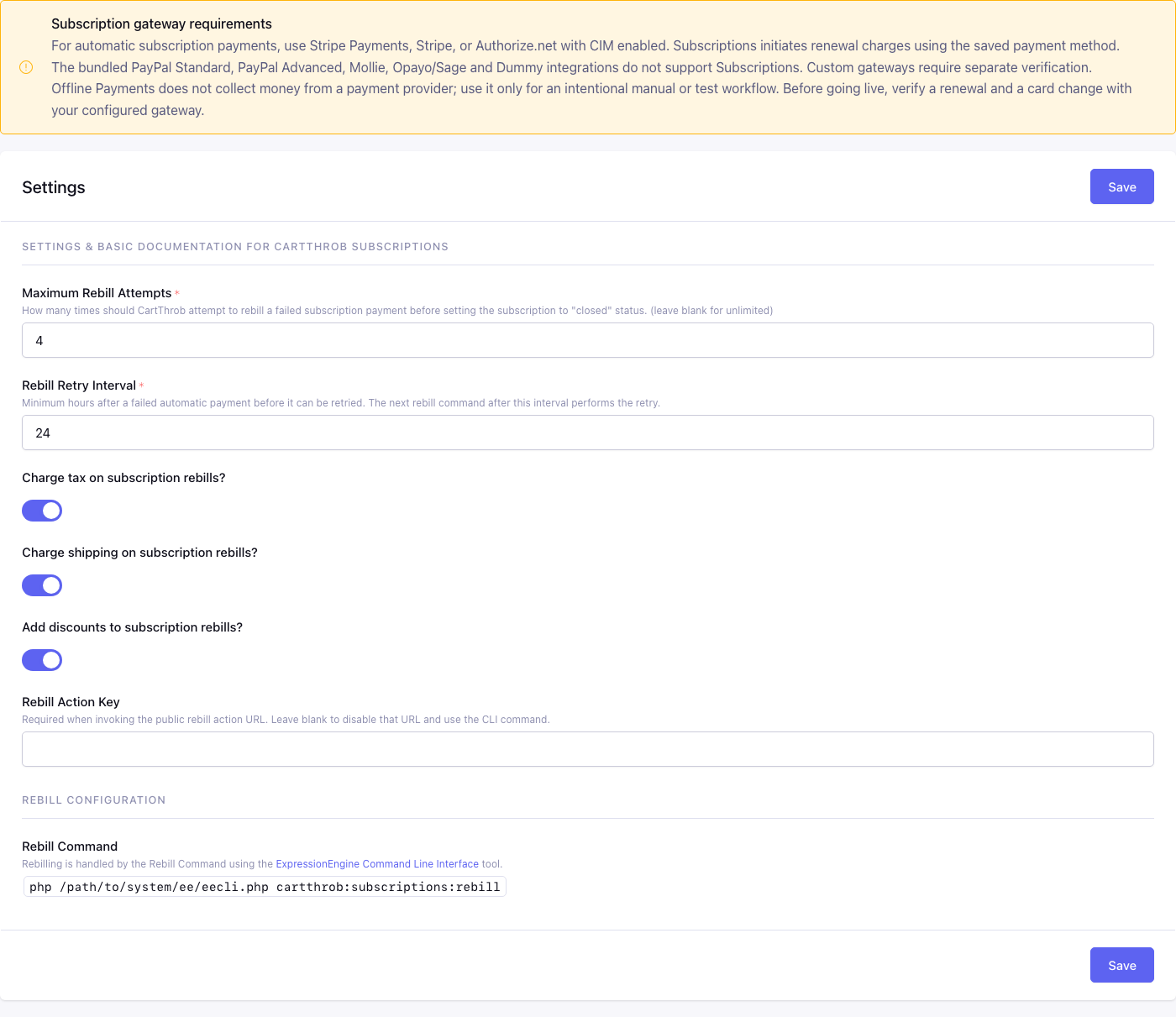
Control panel location: Add-ons > CartThrob Subscriptions > Utilities > Settings
Subscription gateway requirements
A notice at the top of Settings summarizes which gateways can bill subscriptions:
For automatic subscription payments, use Stripe Payments, Stripe, or Authorize.net with CIM enabled. Subscriptions initiates renewal charges using the saved payment method.
The bundled PayPal Standard, PayPal Advanced, Mollie, Opayo/Sage and Dummy integrations do not support Subscriptions. Custom gateways require separate verification.
Offline Payments does not collect money from a payment provider; use it only for an intentional manual or test workflow. Before going live, verify a renewal and a card change with your configured gateway.
See Eligible payment gateways.
Maximum Rebill Attempts*
The number of consecutive declined renewal payments allowed, counting the first decline. The default is 4. Each earlier decline places the Subscription on Hold for a retry. The decline that reaches the limit closes the Subscription and sends rebill_final_failure. A successful renewal resets the count. Only a decline confirmed by the gateway counts as an attempt.
| Value | Declined attempts allowed |
|---|---|
0, 1 or 2 |
2: the first attempt plus one retry |
3 or more |
That number |
The effective minimum is 2, so there is always at least one retry. The field is required; unlimited retries are not supported.
Rebill Retry Interval*
The minimum number of hours after a failed automatic payment before it is retried. The default is 24 and the minimum is 1. The retry happens on the first run of the rebill command after the interval has passed. Saving the Subscription in the Control Panel restarts the wait. See Scheduling with cron.
Charge tax on subscription rebills?
Yes recalculates tax on each renewal using the customer’s saved address. No charges renewals without tax. Product tax exemptions still apply.
Charge shipping on subscription rebills?
Yes recalculates shipping on each renewal. No charges renewals without shipping. Product shipping exemptions still apply.
Add discounts to subscription rebills?
Yes applies the current eligible rules in CartThrob’s Discounts channel to each renewal. Coupon codes used at the original checkout are not reapplied.
See Renewal amounts for how renewal totals are calculated.
Rebill Action Key
A secret that enables the HTTP rebill action URL. While the key is blank, the URL is disabled and only the command-line rebill runs.
Rebill Command (read-only)
The exact command to schedule for this installation, for example:
php /path/to/system/ee/eecli.php cartthrob:subscriptions:rebill
See Setting up rebilling.
Saving shows “Settings Saved”. If a value is invalid, “Error Updating Settings” is shown.
Installation
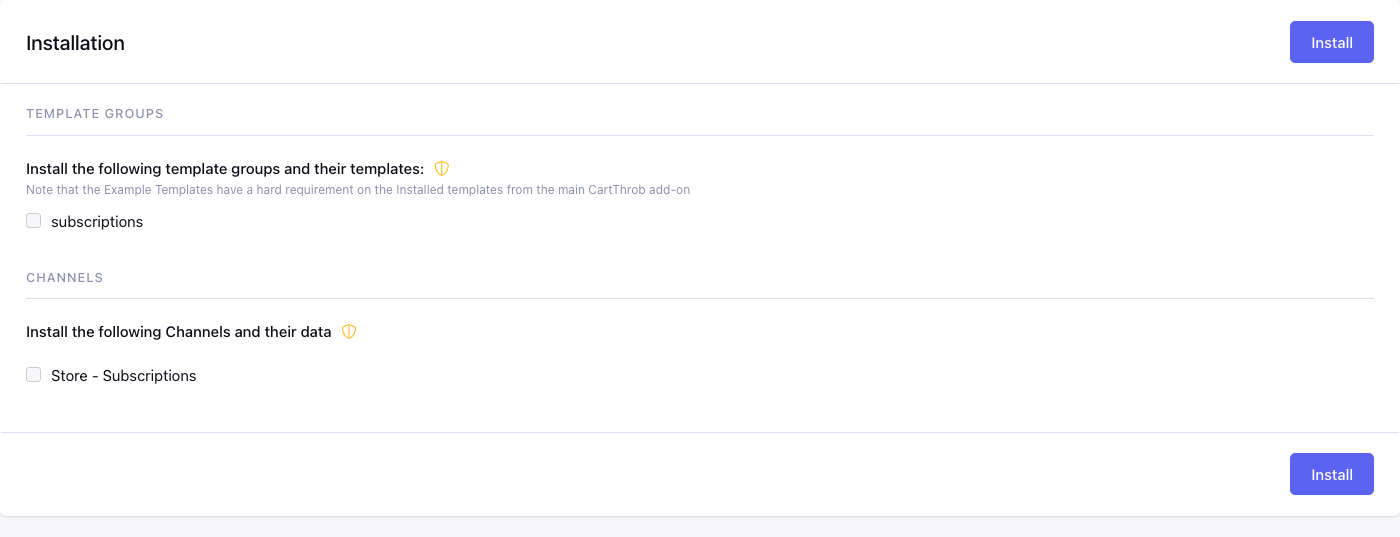
Control panel location: Add-ons > CartThrob Subscriptions > Utilities > Installation
Installs the optional example templates and sample channel. Nothing here is installed automatically, and installing is never required to use Subscriptions.
Template Groups
subscriptions installs 14 example templates covering every step a customer takes:
- choosing a Plan, product or donation;
- the cart and checkout;
- saving a card;
- the customer account with payment history;
- changing the card;
- changing Plan;
- cancelling;
- a members page that only customers with a qualifying subscription can see.
The page notes that “the Example Templates have a hard requirement on the Installed templates from the main CartThrob add-on”. The examples reuse the store group’s header, navigation and checkout pages, so install CartThrob’s store templates first.
Channels
Store - Subscriptions installs a subscriptions channel with:
- a Description field;
- a Subscription Details field (the Subscription Settings fieldtype);
- a sample Monthly Donation entry: 12.00 monthly, with a trial price of 5.00 for the first payment. The field also stores two trial occurrences, but a product subscription uses the trial price for the first payment only; see Subscription Settings Fieldtype.
Installing either option creates a Permission named Subscriptions demo members (site 1), using your site ID, or reuses it if it already exists. The sample entry grants it, and the members template checks for it, so the demo works straight after installing. Plans you create yourself need that Permission assigned before a purchase grants access to the members page. Copying the template files by hand skips this step: replace the 0 in members with a real Permission ID.
Existing groups and channels
The Installation page never overwrites anything. A subscriptions template group, or a channel with the short name subscriptions, that already exists is not offered again. The page shows “Template group exists.” or “Channel exists.” instead.
Upgrading Subscriptions does not change templates already installed on your site. To use the 6.0 examples on a site that already has a subscriptions group, compare them with the files in the add-on’s installer/templates/subscriptions.group folder and copy what you need. You can also rename your existing group and then install.
On success, “Installation Successful” lists what was created. Otherwise, “Installation Error” lists what could not be installed.