Packages
What are Packages?
Packages are a way of creating a bundle of products that can be sold as one product.
Install the CartThrob Package fieldtype
If you are installing a fresh install of CartThrob, you do not need to manually install the fieldtype, it will be done for you when you install the module. If you are upgrading from a previous version of CartThrob, you will need to install the fieldtype from the Add-ons page before proceeding.
Add a new CartThrob Package field to your Products channel
Head to Admin > Channel Administration > Channel Fields to add a CartThrob Package field to your Products channel. You may, in fact, want to create a separate channel for Package products and map it accordingly in your CartThrob product settings.
Working with the CartThrob Package interface
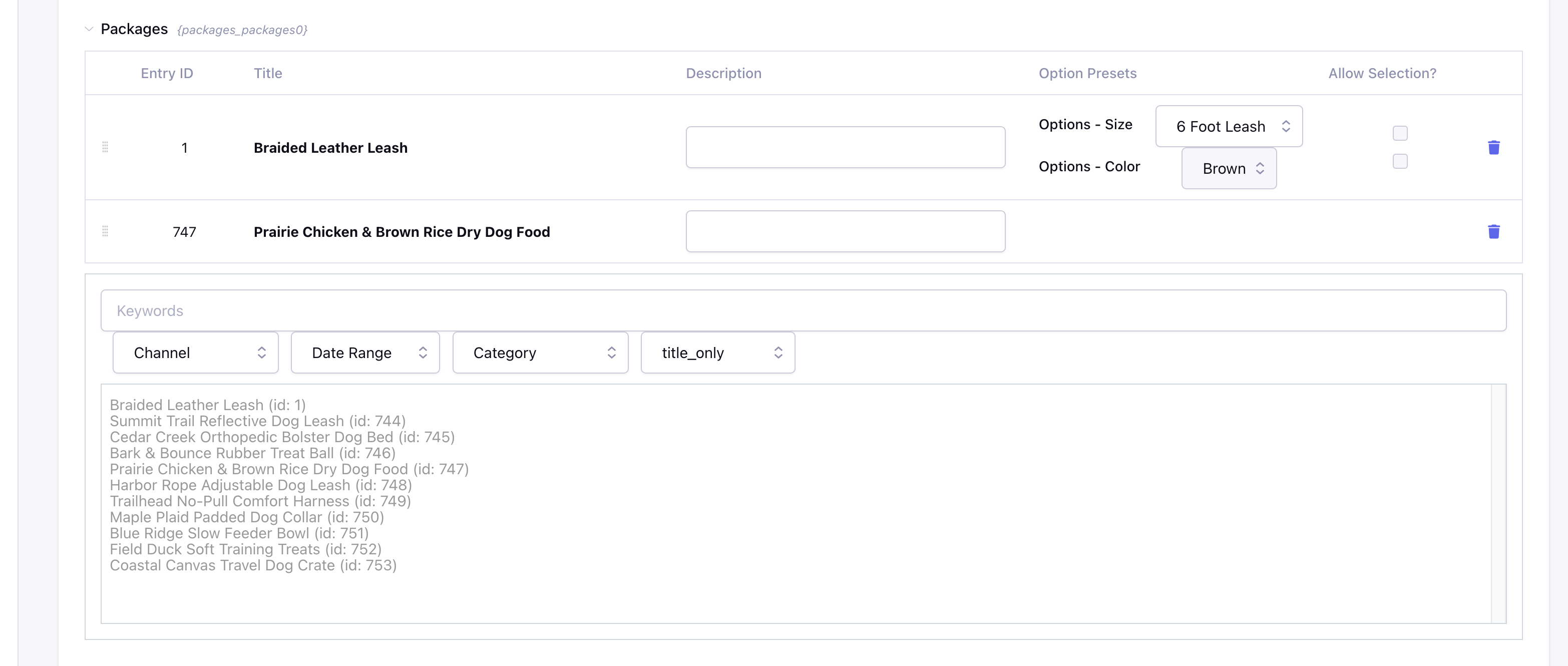
When creating a new entry in your Packages channel, you will see the CartThrob Package Interface. Below the table which shows which products are part of the package, you will see a filter-able list of entries from your Products channel(s). Click on a product in the list to add it to the package. Once a product is in the package list, you can set defaults for Item Options/Price Modifiers, and set whether or not the user can change this selection.
How Prices Work
If your Packages channel has a price field mapped to it AND there is a value in the price field, that will be used as the package price. If you do not have a price field mapped OR you have left the price field blank, the price will be determined by the sum of all the products in the package.
Template Tags
Package within {exp:channel:entries}
{exp:channel:entries channel="product_packages"}
    {if your_package_field_short_name}
    <ul>
    {your_package_field_short_name}
        <li>
            {title} {entry_id} {url_title} etc.
            {exp:cartthrob:item_options entry_id="{entry_id}" row_id="{row_id}"}
            {if allow_selection}
                <label>{option_label}</label>
                {select}
            {/if}
            {/exp:cartthrob:item_options}
    {/your_package_field_short_name}
    </ul>
    {/if}
{/exp:channel:entries}
Package within {exp:cartthrob:cart_items_info} & {exp:cartthrob:update_cart_form}
{exp:cartthrob:update_cart_form}
    {exp:cartthrob:cart_items_info}
        {title} {item_price} {quantity}<br />

        {package}
            {sub:title} - {sub:entry_id}<br />
            {exp:cartthrob:item_options entry_id="{sub:entry_id}" row_id="{sub:row_id}"}
            {if allow_selection}
                <label>{option_label}</label>
                {select}
            {/if}
            {/exp:cartthrob:item_options}
        {/package}

        <input type="checkbox" value="1" name="delete[{row_id}]">
    {/exp:cartthrob:cart_items_info}
    <input type="submit">
{/exp:cartthrob:update_cart_form}
Set item_options of package sub-items manually in {exp:cartthrob:add_to_cart_form}
{exp:channel:entries channel="product_packages"}
    {exp:cartthrob:add_to_cart_form entry_id="{entry_id}"}
        {your_package_field_short_name}
        <input type="text" name="item_options[{row_id}][your_option_name]" value="">
        {/your_package_field_short_name}
    {/exp:cartthrob:add_to_cart_form}
{/exp:channel:entries}