Orders
Maps the orders channel, checkout save behavior, order statuses, and which channel fields receive each saved value. Required before checkout can persist orders.
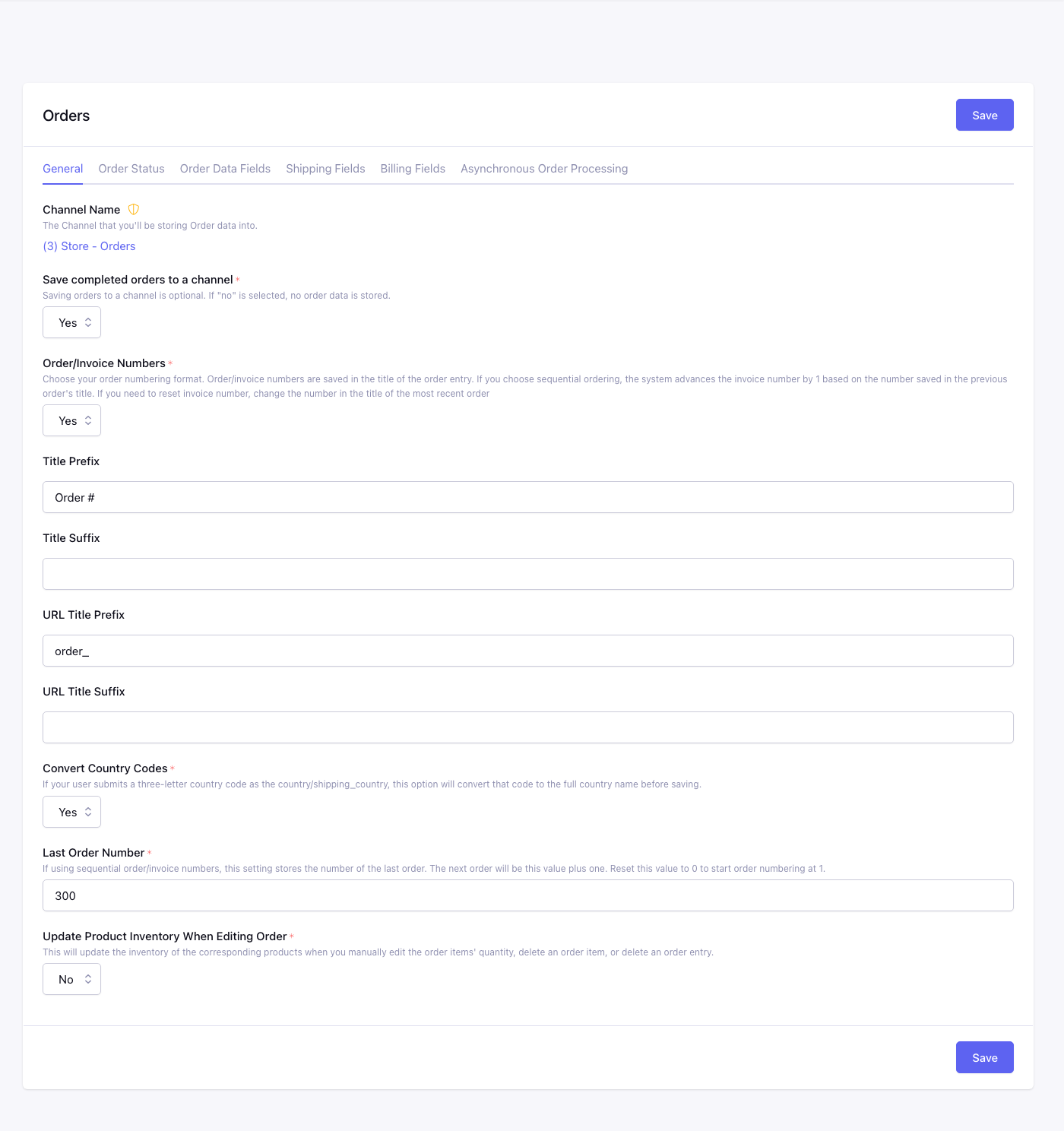
Tabs: General, Order Status, Order Data Fields, Shipping Fields, Billing Fields, Asynchronous Order Processing.
General
Channel
Orders channel link. Change via Set Channel if you have not configured one yet.
Save Orders
No: checkout completes but no order entry is created. Yes: each successful checkout creates an entry in the orders channel.
Order/Invoice Numbers
Two numbers exist on every saved order. They are easy to mix up because they can be the same digits, depending on this setting, and they are not always.
- Entry ID is the ExpressionEngine entry ID.
{order_id}and{entry_id}always pull this. Tag parameters namedorder_idalways want this. Use it fororder_items, purchased-items links, and invoice URLs. - Invoice number is the ID contained in the order entry title
(prefix and suffix wrap it).
{title}and{invoice_number}pull the full title.{order_number}(onsubmitted_order_info) is those digits from the title. Print these on receipts.
Yes (sequential): checkout increments Last Order Number and writes
prefix + N + suffix into the title before EE creates the entry. The
entry ID is assigned separately and can skip. Reset the sequence with
Last Order Number, not by editing a previous title.
No (use entry ID): after the entry exists, the title is rewritten to
prefix + entry ID + suffix. Then the ID in the title is the entry
ID, so a gap in entry IDs also appears on invoices.
Orders Title Prefix / Suffix
Orders URL Title Prefix / Suffix
Wrapped around the invoice ID in the title and URL title.
Orders Convert Country Code
Yes: converts three-letter country codes submitted as country or shipping_country to full country names before save.
Last Order Number
Sequential invoice sequence only. Next invoice number is this value
plus one. Set 0 to start at 1. This is not the last entry ID.
Update Inventory When Editing Order
No: Control Panel order edits change the saved order only; product inventory
is not adjusted.
Yes: changing an order item quantity, removing an item, or deleting an order
attempts to adjust product inventory by the corresponding difference.
If an edited Order Item contains a saved Configurator selection that no longer matches the product’s current combinations, CartThrob saves the order but skips that inventory adjustment rather than applying it to a different combination. The Control Panel warning lists the affected product entry IDs. Review and reconcile inventory for those products manually.
Order Status
Maps payment/checkout outcomes to channel entry statuses on the orders channel. Only matters if the channel uses custom statuses (e.g. paid, shipped).
| Field | When CartThrob sets it |
|---|---|
| Default Status | Successful completed order |
| Processing Status | In-process orders (PayPal Standard, offline payments, etc.) |
| Failed / Declined Status | Payment failed or declined |
| Pending / Expired / Canceled / Voided / Refunded / Reversed / Offsite | Matching gateway or Order Manager status transitions |
With CartThrob 10 payment reconciliation,
a new reconciliation hold retains internal Processing but uses closed for
the order entry, independently of the ordinary Processing Status mapping.
It withholds new Purchased Item entries and successful-checkout benefits.
An order already completed before a later local failure is not downgraded.
Order Data Fields
Each dropdown maps a checkout value to an orders channel field. All marked mappings are required to save.
| Field | Notes |
|---|---|
| Order Items | Serialized line-item data (entry_id, qty, title, options). See Order Items fieldtype. |
| Subtotal / Subtotal + Tax / Tax / Discount / Total | Cart totals at checkout |
| Transaction ID | Required for most gateway refunds via Order Manager |
| Card Type / Last Four Digits | Stored when gateway provides them |
| Coupon Codes | Applied coupon codes |
| Payment Gateway | Gateway short name used |
| Error Message | Gateway decline/failure message |
| Language | Customer language preference |
| Customer Name / Email | Required |
| Customer IP / Phone / Site ID | Optional audit fields |
| Subscription ID / Vault ID | Recurring or saved-payment references |
Shipping Fields
Maps shipping method, cost, and address components saved on the order entry. Shipping Option is the selected shipping plugin/method name.
Billing address fields: Shipping First/Last Name, Company, Address, Address2, City, State, Zip, Country, Country Code, Phone, Full Shipping Address (combined).
Billing Fields
Same pattern for billing: Full Billing Address, name, company, address lines, city, state, zip, country, Country Code.
Asynchronous Order Processing
Offline payments only. Queues order post-processing so heavy work does not block the checkout response.
| Option | Behavior |
|---|---|
| Disabled | Process immediately at checkout |
| HTTP | Process one queued job per incoming web request |
| Cron | Process via scheduled hit to the consume URL shown on this tab |
Worker Base URL — Override if the cron/HTTP worker must call a different site URL (multi-server setups).