CartThrob Payment Plugins Edit Cartthrob Authorize Net
This page configures payment gateways and their settings for processing checkout payments.
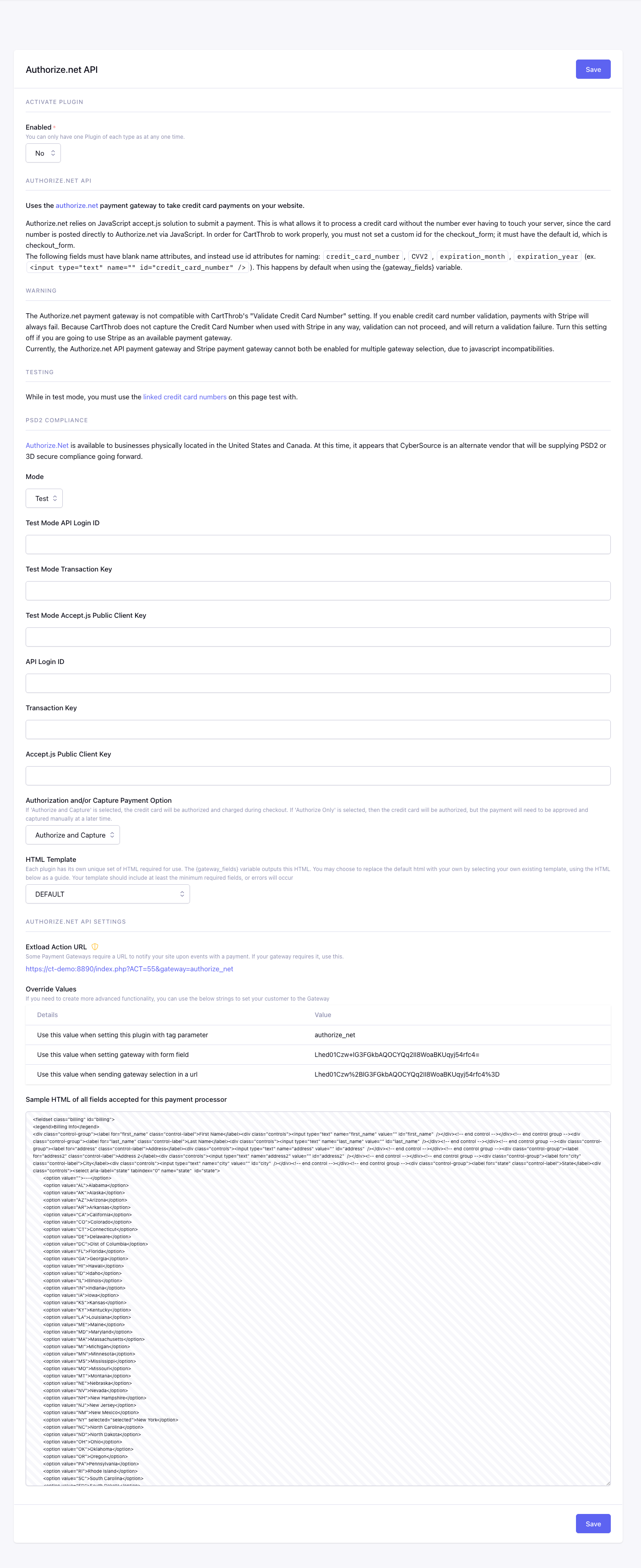
Fields
Enabled
Checkout uses this plugin only when Yes.
Mode
Selects whether this gateway uses test/sandbox credentials or live production credentials.
Available options are Test, Live.
Api Login Id Test*
Stores the Authorize.net API Login ID used in test mode.
Api Transaction Key Test*
Stores the Authorize.net transaction key used in test mode.
Api Public Client Key Test*
Stores the Authorize.net Accept.js public client key used in test mode.
Api Login Id Live*
Stores the Authorize.net API Login ID used for live transactions.
Api Transaction Key Live*
Stores the Authorize.net transaction key used for live transactions.
Api Public Client Key Live*
Stores the Authorize.net Accept.js public client key used for live checkout fields.
Authorize Net Capture
Controls whether Authorize.net authorizes and captures payment immediately or only authorizes the transaction for later capture.
Available options are Authorize and Capture, Authorize Only.
Gateway Fields Template
EE template used by {gateway_fields} and {selected_gateway_fields}.
When configured, this template replaces CartThrob’s complete default gateway output. It must include every required customer field and gateway integration element. Do not render the custom output together with duplicate inputs using the same names or IDs. See Gateway-generated fields and inline errors.
Checkout Form Markup
Settings summary
Read-only view of saved plugin values. Edit in the form above.
Checkout behavior
The built-in Authorize.net checkout finalizes CartThrob’s authoritative total
before Accept.js tokenization and payment. If submitted address, shipping,
coupon, or other checkout data changes the total, the configured
checkout_form price-change presentation
runs before payment continues. Omitting price_change_handling uses the
silent none default.
With custom_js="yes",
your integration owns any amount preview and shopper confirmation. Authorize.Net
does not require a checkout quote by default: the server sends the amount with
the payment request. A supplied quote is still validated, and explicitly setting
require_checkout_quote="yes" on a custom-JavaScript form requires one.
See Checkout Amounts and Payment Review
for the distinction between quote presentation and enforcement.
Order Manager refunds are supported when Authorize.net provides a refundable transaction reference.
Uncertain payment outcomes
Authorize.Net is not currently integrated with the automatic reconciliation capture tracking added for Stripe Payments and PayPal in PRs #979 and #980. Accept.js supplies a token; the charge amount is sent by CartThrob in its server-side request. A browser-collected stale amount is therefore not the same concern in this integration.
A lost response after an Authorize and Capture request, or a local error after a successful provider response, can still leave the local order incomplete. Do not assume a displayed error proves that no payment occurred. Check the transaction in Authorize.Net before retrying. These failure windows are not repaired by the new reconciliation PRs and do not automatically provide a Complete paid order action.
Authorize Only is a separate outcome: successful authorization is not collection. Any future recovery integration must distinguish authorization from capture. See gateway coverage.