CartThrob Payment Plugins Edit Cartthrob Mollie
This page configures payment gateways and their settings for processing checkout payments.
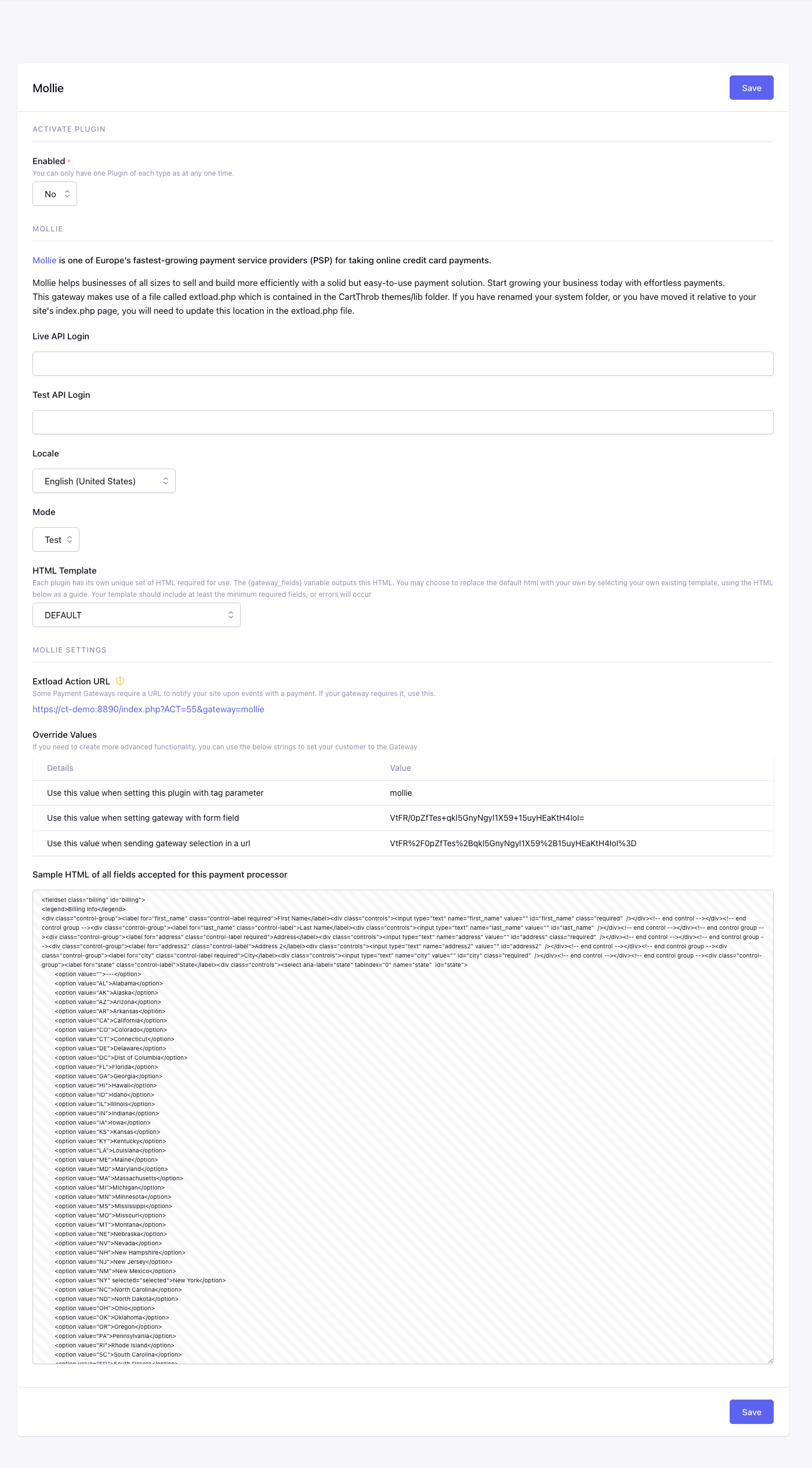
Fields
Enabled
Checkout uses this plugin only when Yes.
Api Login*
Stores the live Mollie API key used for production payments.
Test Api Login*
Stores the Mollie test API key used while testing payments.
Locale
Sets the locale Mollie uses for hosted payment screens and customer-facing gateway text.
The dropdown lists supported Mollie checkout locales.
Mode
Selects whether this gateway uses test/sandbox credentials or live production credentials.
Available options are Test, Live.
Gateway Fields Template
EE template used by {gateway_fields} and {selected_gateway_fields}.
When configured, this template replaces CartThrob’s complete default gateway output. It must include every required customer field and gateway integration element. Do not render the custom output together with duplicate inputs using the same names or IDs. See Gateway-generated fields and inline errors.
Checkout Form Markup
Settings summary
Read-only view of saved plugin values. Edit in the form above.
Checkout behavior
Mollie redirects the customer to Mollie’s hosted payment screen to choose
a payment method and complete payment, then returns them to your site.
Configure
extload.php
for this gateway.
On the browser return, CartThrob checks the current order status with Mollie. Confirmed payments complete checkout and clear the cart. A payment that is still pending returns through the processing path without clearing the cart; canceled and expired payments use the failed path and also preserve the cart.
Phone numbers
CartThrob’s standard Mollie gateway fields include a phone input. Mollie only
accepts that address value in international E.164 form, such as
+31611426136. Before sending the order, CartThrob removes spaces, periods,
and hyphens from an otherwise valid international number. A local or invalid
value is omitted so that the phone field does not cause Mollie to reject the
entire order.
To include the phone number in the Mollie order, the customer must enter the
complete number with its leading + and country calling code. CartThrob does
not guess a country calling code or convert a national number because that can
silently produce the wrong number.
Optional browser validation
The standard gateway field is generated as input[name="phone"]. Add the
following script after the gateway fields if you want the browser to catch an
invalid non-empty value before submitting the checkout form:
<script>
(function () {
    var phone = document.querySelector('input[name="phone"]');

    if (!phone) {
        return;
    }

    phone.type = 'tel';
    phone.autocomplete = 'tel';

    function validatePhone() {
        var value = phone.value.replace(/[\s.-]/g, '');
        var valid = value === '' || /^\+[1-9]\d{1,14}$/.test(value);

        phone.setCustomValidity(
            valid
                ? ''
                : 'Enter a complete international phone number, such as +31611426136.'
        );
    }

    phone.addEventListener('input', validatePhone);
    validatePhone();
}());
</script>
This permits the spaces, periods, and hyphens that CartThrob removes before contacting Mollie. It leaves the field optional. Checkout JavaScript that bypasses the browser’s normal form validation must perform an equivalent check. Regardless of browser validation, CartThrob omits an invalid value from the Mollie request.
Order-line reconciliation
Mollie requires the submitted order lines to add up to the amount CartThrob charges. When an order-level checkout override makes that amount differ from the saved product rows, CartThrob can add a line named Checkout total adjustment for the difference. The adjustment carries zero VAT.
This line is reconciliation data for Mollie. It does not reprice the underlying CartThrob order items and it does not determine whether those products are taxable. Compare Mollie’s complete set of order lines with the authoritative CartThrob order total, rather than expecting the product rows alone to add up after an order-level override.