CartThrob Payment Plugins Edit Cartthrob Sage S
This page configures payment gateways and their settings for processing checkout payments.
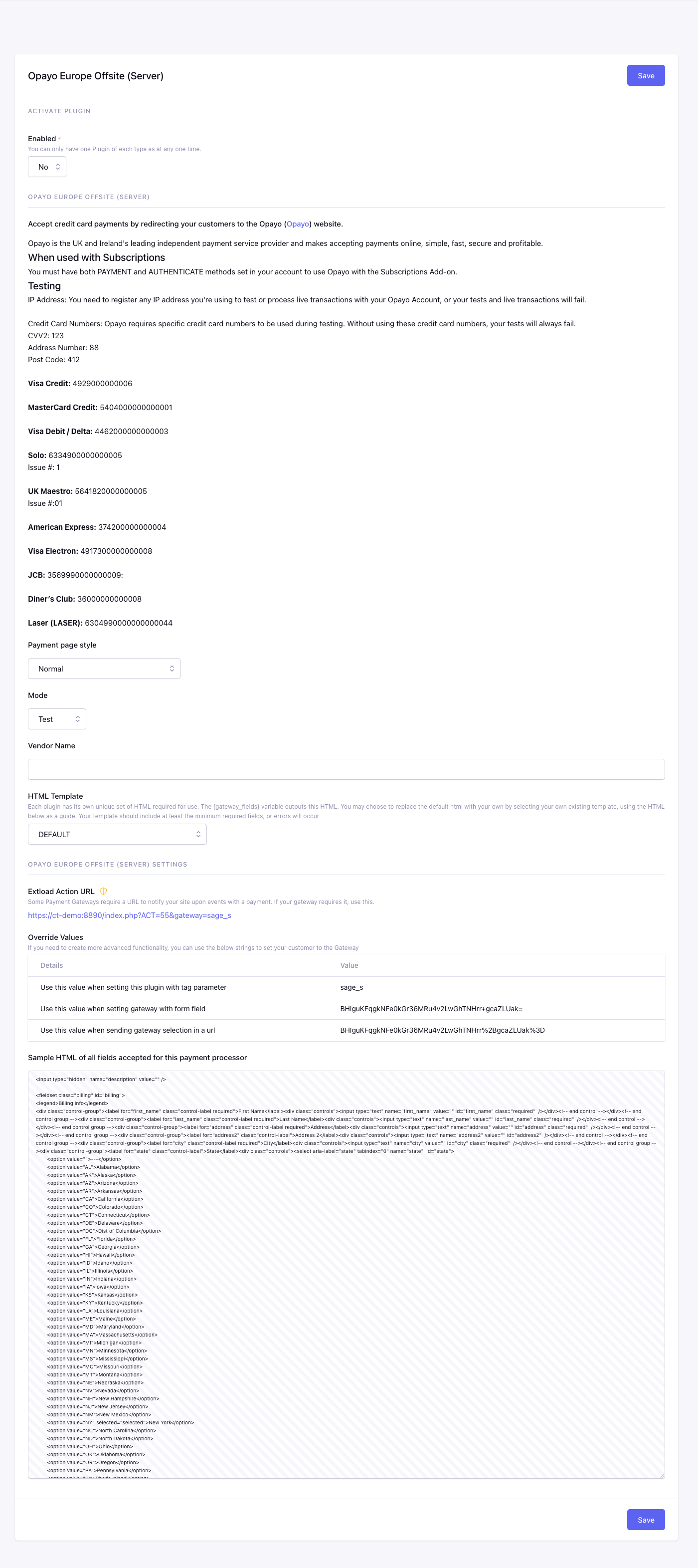
Fields
Enabled
Checkout uses this plugin only when Yes.
Profile
Selects the Opayo Server profile style used when customers are redirected to the hosted payment page.
Available options are Normal, Minimal formatting for use in iFrames.
Mode
Selects whether this gateway uses test/sandbox credentials or live production credentials.
Available options are:
SimulatorTestLive
Vendor Name*
Stores the Opayo vendor name used to identify your gateway account.
Gateway Fields Template
EE template used by {gateway_fields} and {selected_gateway_fields}.
When configured, this template replaces CartThrob’s complete default gateway output. It must include every required customer field and gateway integration element. Do not render the custom output together with duplicate inputs using the same names or IDs. See Gateway-generated fields and inline errors.
Checkout Form Markup
Settings summary
Read-only view of saved plugin values. Edit in the form above.
Checkout behavior
Opayo Europe Offsite (Server) sends the customer to Opayo’s hosted payment page to enter card details, then returns them to your site to finish checkout. CartThrob marks the order processing until the offsite callback completes.
Configure
extload.php
for this gateway.