CartThrob Payment Plugins Edit Cartthrob Stripe Payments
This page configures payment gateways and their settings for processing checkout payments.
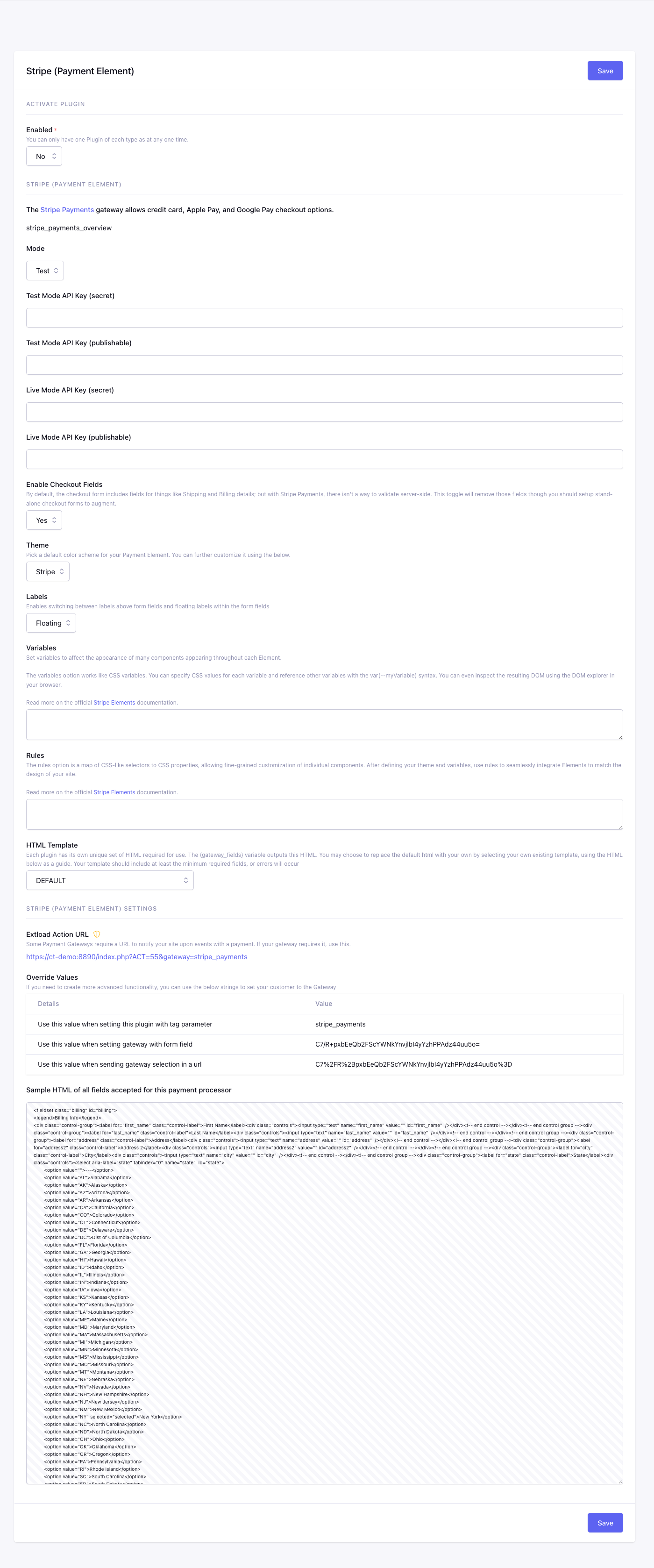
Fields
Enabled
Checkout uses this plugin only when Yes.
Mode
Selects whether this gateway uses test/sandbox credentials or live production credentials.
Available options are Test, Live.
Api Key Test Secret*
Stores the Stripe test secret key used for server-side test transactions.
Api Key Test Publishable*
Stores the Stripe test publishable key used by checkout browser-side Stripe fields.
Api Key Live Secret*
Stores the Stripe live secret key used for server-side production transactions.
Api Key Live Publishable*
Stores the Stripe live publishable key used by checkout browser-side Stripe fields.
Enable Fields
Controls whether CartThrob adds its standard customer-information fields to the gateway output.
Choose Yes to include those fields with the Stripe Payment Element. Choose
No to omit them. When they are omitted, your checkout template must provide
any customer fields required by checkout_form exactly once; otherwise inline
validation can report an error the customer has no field available to correct.
Available options are No, Yes.
Theme
Sets the Stripe Payment Element theme.
Available options are:
NoneStripeNightFlat
Labels
Controls where Stripe Payment Element labels are displayed.
Available options are Floating, Above.
Variables
Stores custom Stripe Payment Element appearance variables.
Rules
Stores custom Stripe Payment Element appearance rules.
Gateway Fields Template
EE template used by {gateway_fields} and {selected_gateway_fields}.
When configured, this template replaces CartThrob’s complete default gateway output. It must include every required customer field and Stripe integration element. Do not render the custom output together with duplicate inputs using the same names or IDs. See Gateway-generated fields and inline errors.
Checkout Form Markup
Settings summary
Read-only view of saved plugin values. Edit in the form above.
Checkout behavior
For ordinary non-subscription checkout, CartThrob finalizes and validates the
authoritative total before creating the Stripe PaymentIntent. If submitted
address, shipping, coupon, or other checkout data changes the total, the
configured
checkout_form price-change presentation
runs before payment continues. Omitting price_change_handling uses the
silent none default; the checkout designer is responsible for keeping
the displayed total current or selecting a review presentation.
For the built-in PaymentIntent sequence, subscription boundaries, metadata, and form requirements, see Stripe Payment Gateway. See also Checkout Amounts and Payment Review.