Edit Product Channel
Maps CartThrob product data fields for one product channel.
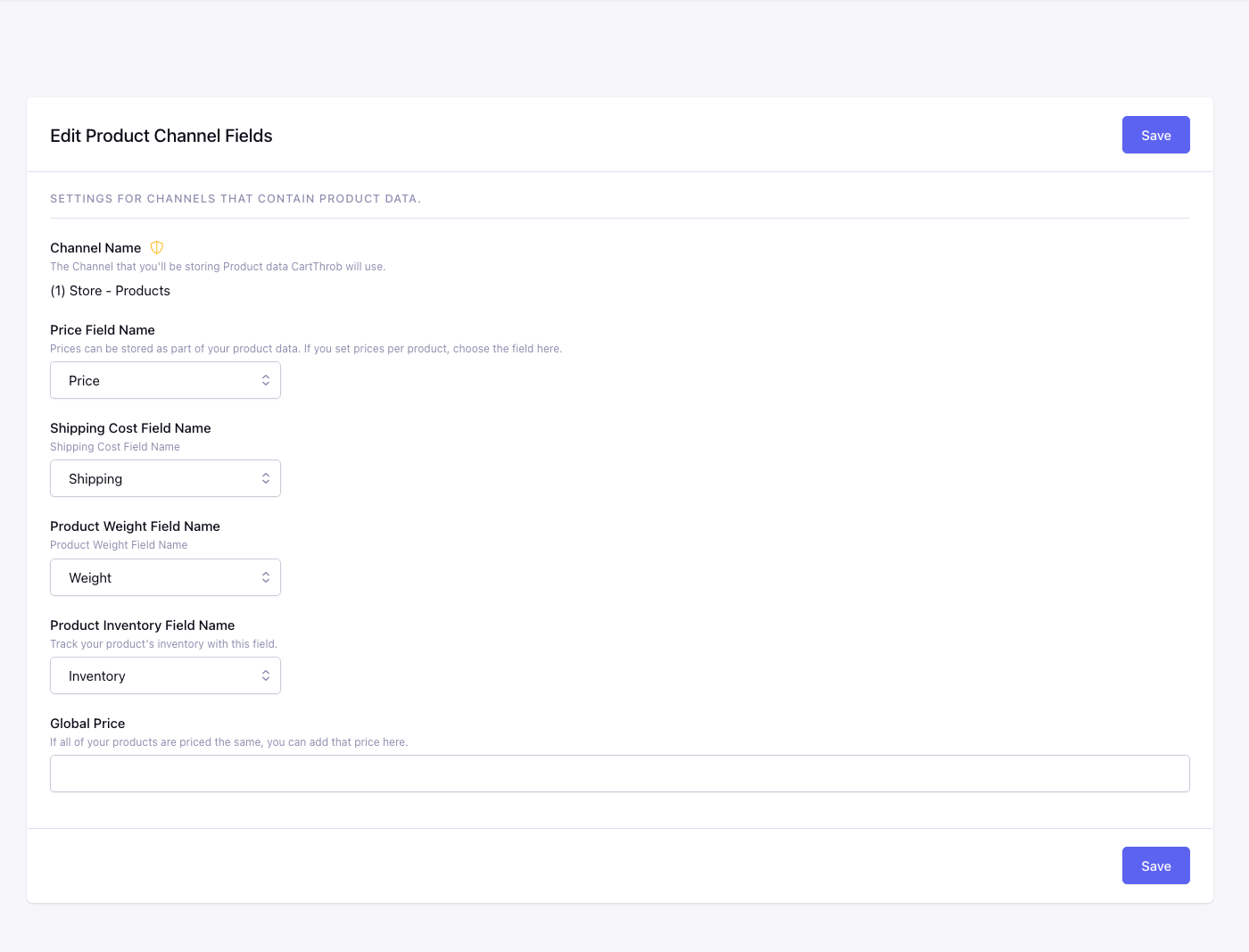
Price
Channel field for product price (CartThrob price fieldtypes or number/text field).
When using a Price Modifiers Configurator field, CartThrob discovers it as a modifier field without requiring it to be mapped here. Usually map a normal base-price field and let the selected generated combination add its adjustment. Map the Configurator here only when each generated combination row supplies the complete price from a zero base.
Shipping
Per-product shipping cost field, if used by your shipping plugins.
Weight
Used by weight-based shipping plugins.
Optionally map the Price Modifiers Configurator here when weight belongs to each complete generated combination/SKU.
Inventory
Maps the field CartThrob uses for stock availability and inventory reduction.
Standard Price Modifiers versus Configurator
These fieldtypes have different inventory and required-selection behavior:
| Standard Price Modifiers | Price Modifiers Configurator | |
|---|---|---|
| Data model | One field contains one independent set of choices, such as Color. | One field contains multiple groups, such as Size and Color, which resolve to one generated combination/SKU. |
| Storefront names | item_options[product_color] |
One generated name per group, such as item_options[configuration:shirt_configurator:color] and item_options[configuration:shirt_configurator:size] |
| Inventory row | The selected option row, such as Green. | The resolved complete combination row, such as Large + Green. |
| No selection | Optional by default. The field contributes no selection or price adjustment and no option row is reduced. | Only when the Configurator is mapped as Inventory must all selectable groups needed to resolve a valid generated combination/SKU be submitted. Without that Inventory mapping, Configurator groups are not made mandatory by the fieldtype itself. |
| How to require choices | Use add_to_cart_form required="item_options[FIELD_SHORT_NAME]". List several fields with | to require one value from each. |
If the Configurator supplies Inventory, inventory validation rejects an incomplete or unknown combination. Otherwise, use template required rules to make generated group inputs mandatory; they may also provide earlier, field-specific validation when inventory enforcement applies. |
- Map an ordinary number/text field to track one inventory value for the entire product.
- Map a Price Modifiers field to track stock for each choice in that field, such as Red, Blue, or Green.
- Map a Price Modifiers Configurator field to track stock for each complete generated configuration/SKU, such as Large + Green.
- A positive value is available.
0is out of stock.- Modifier inventory is tracked only when an option row has an explicit
numeric inventory value. A missing inventory column,
null, or a blank value means unlimited inventory for that option. - An entry with no option rows is also unlimited.
- Standard Price Modifiers fields are optional unless the storefront template requires them. If the add-to-cart form omits the mapped option field, CartThrob records no selection or price adjustment from that field and does not assign or reduce a specific option row. With no options selected, the item uses the product’s base price.
- For a standard Price Modifiers field mapped as Inventory, an
explicitly submitted option must match an
option_valuestored in that field. Unknown and malformed submitted values are rejected. - Leaving the Inventory mapping itself empty means products in the channel are not inventory-limited.
Each product channel has one Inventory mapping, and that mapped field is the product’s inventory source. For example, if Color is mapped and the customer buys Green, CartThrob checks and reduces the Green row. It does not also reduce a separate product-wide Inventory field or a Size modifier field. If Size is not the mapped inventory field, selecting or omitting Size does not change Size inventory.
Use the standard Price Modifiers field when one option field represents the stock unit you need to count. Use Price Modifiers Configurator when stock belongs to a complete combination of choices. CartThrob does not maintain several overlapping stock pools for one purchase, such as product-wide stock plus Color stock plus Size stock.
For the complete Configurator setup—including base-price choices, optional Inventory and Weight mappings, and storefront/cart/order template examples—see Price Modifiers Configurator FieldType.
CartThrob checks this inventory when items are added or updated and
before checkout. Inventory is reduced when the completed order is
processed. Storefront templates can display availability with
is_in_stock, and modifier option
loops can use their {inventory} value.
For a standard Price Modifiers field, the Control Panel mapping does not
make the storefront choice required. To require one value from an
option field, add that field to
add_to_cart_form’s required parameter,
for example required="item_options[product_color]". List multiple
field names with | when the customer must choose one value from each
listed field.
Tax Exempt
Maps the product field that determines whether the current entry is
tax exempt. Values such as Yes, true, y, on, and 1 mark the
product as exempt.
This is live product configuration, not a value permanently copied when the item is added. If the entry changes while an item remains in the cart, the current mapped value is used the next time CartThrob calculates the item and when checkout is finalized.
Shipping Exempt
Maps the product field that determines whether the current entry is excluded from shipping calculations. The same truthy values supported by Tax Exempt apply.
Like the tax setting, CartThrob reads the current entry value during calculation and final checkout. The completed order preserves the shipping status that was used for that transaction.
Global Price
Fallback price when Price is unmapped or empty. Use when every product in this channel shares one price.
When mapped product settings are evaluated
Mapped product data is the default server-side source for price, shipping, weight, inventory, modifiers, and tax/shipping exemptions. CartThrob reads the current entry data when it calculates the cart and again when it finalizes checkout. Product settings are not guaranteed to remain frozen merely because the item is already in the cart.
Authorized parameters on
add_to_cart_form can create
item-level overrides. Amount and exemption parameters on
checkout_form override the
calculated product/cart settings for that checkout. Inventory
validation is never bypassed by a price, tax, or shipping override.
If current product data, customer information, or a checkout parameter changes the total after the checkout page was rendered, supported built-in payment flows require the customer to review the recalculated amount before payment.