Upgrading to CartThrob 10
CartThrob 10 is a security-focused major release. It protects financial form settings, final checkout amounts, payment references, and download sources more strictly than CartThrob 9.0.1. Most stores built with CartThrob’s native tags continue to work, but custom forms, custom payment JavaScript, extensions, and older download fields must be reviewed.
If the store sells files, read Downloadable products and CartThrob Download fieldtype before disabling the temporary download compatibility setting. CartThrob 10 validates both the field supplying a file and the file source itself; that validation does not replace the site’s purchase/member authorization.
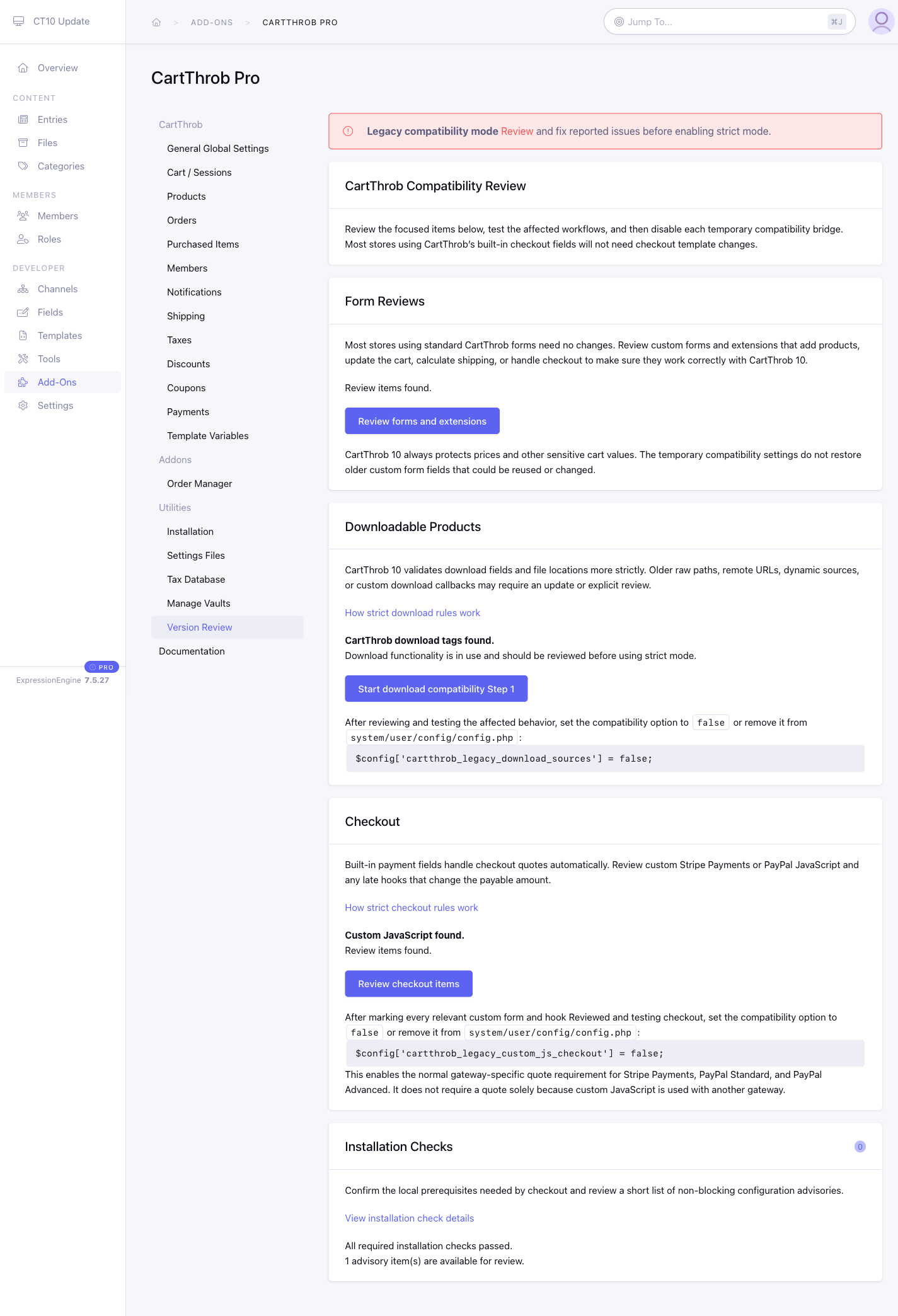
The Version Review utility is added only to installations upgraded from a pre-10 version. Fresh CartThrob 10 installations start in strict mode and do not show the upgrade-review navigation or temporary compatibility bridges.
Before updating
- Back up the database, templates,
system/user/config/config.php, and the current CartThrob and Order Manager add-on folders. - Update a staging copy first. Use the same templates, extensions, gateways, product fields, downloads, and external caches as production.
- Inventory custom CartThrob forms, checkout JavaScript, checkout/cart/download hooks, remote download URLs, and raw download paths.
- If
config.phpis read-only in production, add both temporary bridge settings before running the updater. Set each totrueonly when that area still needs migration, otherwise set it tofalse.
$config['cartthrob_legacy_custom_js_checkout'] = true;
$config['cartthrob_legacy_download_sources'] = true;
These are migration bridges, not general compatibility switches. They do not weaken CartThrob 10’s protected form policy, payment reconciliation, unsafe-network protections, or purchase/member access checks.
Update and review
- Back up and replace the CartThrob and Order Manager folders in
system/user/addonsandthemes/user, then run the ExpressionEngine add-on updater. - Purge any CDN, reverse proxy, static-page cache, or third-party template cache. The updater clears ExpressionEngine page and tag caches, but cannot clear external caches.
- Open CartThrob → Version Review and allow every check to finish.
- Fix definite failures. Inspect and test every manual-review item before selecting Mark reviewed.
- Test normal and unusual product types, cart updates, coupons, tax, shipping, downloads, Vault forms, every selectable gateway, and any extension that changes CartThrob data.
- Disable or remove each bridge after its area passes testing:
$config['cartthrob_legacy_custom_js_checkout'] = false;
$config['cartthrob_legacy_download_sources'] = false;
- Rerun Version Review in strict mode, repeat the storefront tests, and only then deploy the same files and configuration to production.
For the meaning and resolution of every review result, see Version Review and compatibility messages. For form migrations with before-and-after examples, see Updating custom forms for CartThrob 10. If the store customizes submitted-order or Processing notification templates, also apply the payment review template update.
What standard forms need
Forms rendered by these native tags create their protected policy automatically:
add_to_cart_formmulti_add_to_cart_formupdate_cart_formcheckout_formget_live_rates_formadd_vault_formupdate_vault_form
The important exceptions are product scope and custom code. An add_to_cart_form granting product-specific permissions must put its trusted entry_id on the tag. A catalog multi_add_to_cart_form granting product-specific permissions must provide authorized_entry_ids. PHP, external template syntax, and extensions still require manual inspection.
Checkout amount changes
Supported built-in Stripe Payments, PayPal Standard, and PayPal Advanced flows finalize a server quote before payment. Render the checkout preview variables near the payment fields, and choose an explicit price_change_handling presentation if the shopper should stop and review a changed total.
{exp:cartthrob:checkout_form
    price_change_handling="review"
    return="store/order_info"}
    <p>Subtotal: {checkout_subtotal}</p>
    <p>Discount: -{checkout_discount}</p>
    <p>Shipping: {checkout_shipping}</p>
    <p>Tax: {checkout_tax}</p>
    <p>Total: {checkout_total}</p>
    {gateway_fields}
    <button type="submit">Continue to payment</button>
{/exp:cartthrob:checkout_form}
When price_change_handling is omitted, the final value is still validated but CartThrob does not add a confirmation presentation. The available explicit modes are confirm, review, inline, and template.
Important compatibility notes
pNTXandpNSHvalues posted by a multi-add form are no longer accepted. Map the product channel’s Tax Exempt and Shipping Exempt fields and save the value on each product.- Old independently generated internal authority fields are ignored. There is no configuration switch that restores them.
- A form left open before the update, or served by an external stale cache, can fail closed and ask the customer to reload.
- Mark reviewed records who reviewed a finding and an optional note. It does not repair a template or change configuration.
Command-line reviews
The Control Panel is the clearest starting point. For deployment checks or large sites, run the matching CLI reviews from the ExpressionEngine installation:
php system/ee/eecli.php cartthrob:compatibility --complete
php system/ee/eecli.php cartthrob:compatibility --area=forms --complete
php system/ee/eecli.php cartthrob:compatibility:download-values --complete
Treat an incomplete, truncated, stale, or failed scan as unresolved. It cannot establish that strict mode is safe.